
On a network everybody sees everybody. In a home it is fine; in a school or in an office of a hundred people it is not: you write to a dozen colleagues, and the list shows you ninety-odd strangers. BeeBEEP 5 had the Workgroups for this, and the new BeeBEEP keeps the idea under a simpler name: circles. A circle is a name, and the people who share one see each other. That is all there is to configure.
The idea
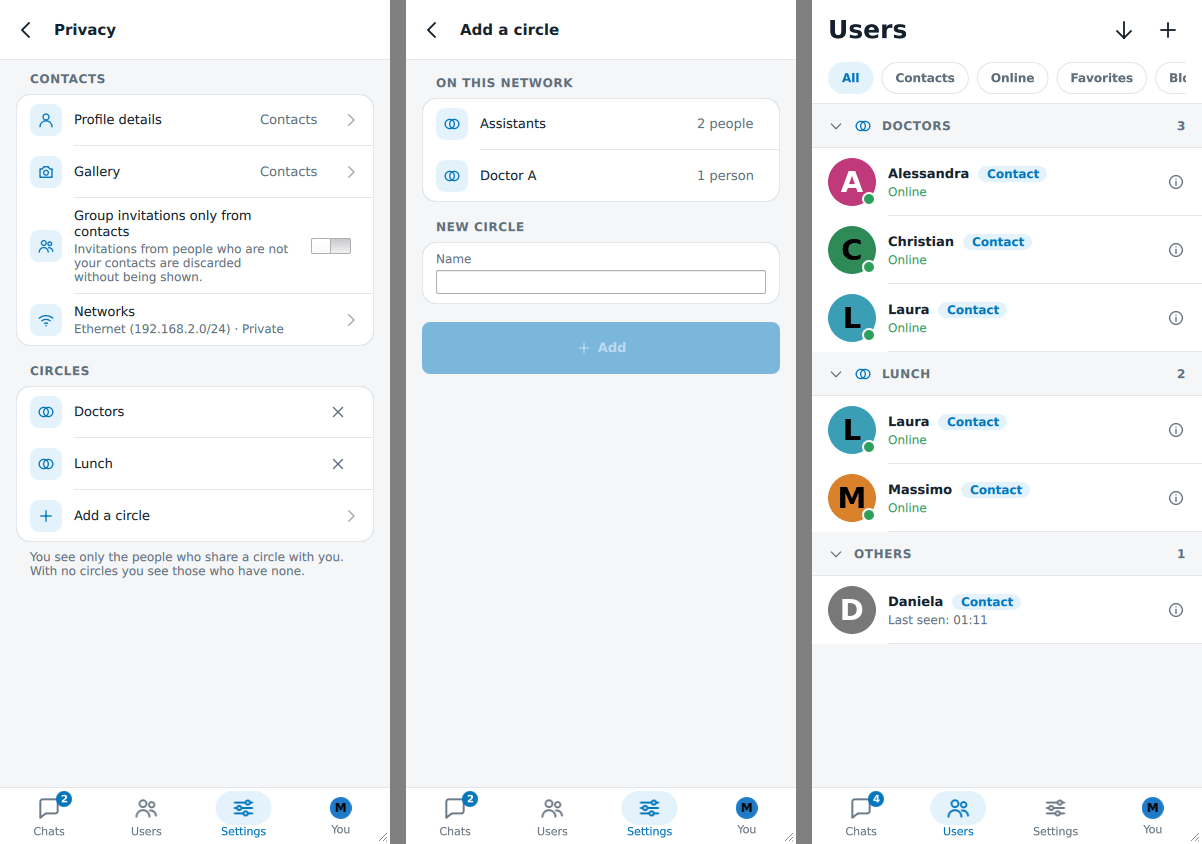
You start with no circles, and then you see everybody who has none. Add a circle and you see only the people who share at least one circle with you. The rule has two halves: you accept someone when you have no circles or when you share one; you and someone are in sight of each other when each accepts the other. People in sight behave as BeeBEEP always does. People out of sight do not exist for each other: no row in the list, no chat, no connection.
Two things follow, and they are the heart of it. One side with circles is enough to put two people out of sight, and they are out of sight of each other, never of one only. And sight is not transitive: you may see two people who do not see each other. That is the point of circles, and, as we shall see, it is also where they can bite.
Circles overlap freely. In a division of a hundred colleagues, one person joins Software development, Statistics, Systems and Lunch and sees a couple of dozen people instead of the hundred. In a medical office, three doctors and three assistants use five circles: Doctor A, Doctor B, Doctor C, Doctors and Assistants. Each doctor sees their own assistant and the other doctors, each assistant sees their own doctor and the other assistants, and the assistants of two different doctors never see each other, although each doctor sees both.
What a circle is not
A circle is not a secret and not a permission. It is a convention among people who cooperate, or a value an administrator gives. Anyone who needs a real boundary uses the network password: it decides who is on the network at all, and circles decide whom, among those, you work with. The names of your circles are not secret either: BeeBEEP announces them with your name to everybody on the network, those you do not see too. That is what lets the page "Add a circle" offer the circles already in use, with the number of people in each, so you choose instead of typing.
Using them well
- Choose, do not type. Three people typing the same circle three ways end up in three circles and do not see each other. Capitals do not matter (Lunch, lunch and LUNCH are one circle), but a typo does.
- Few circles, with names everybody understands. One for the team, one for what crosses teams, and that is often enough.
- In an office, let the administrator set them. Giving every computer its circles in the policy file locks them: the user sees them with "Set by your administrator" and cannot add or remove one. Nobody disappears by a slip.
- Everybody who must see each other shares a circle. If you want to be in a circle and still see everyone, join every circle.
When it goes wrong
Almost every problem with circles is the same problem: somebody is out of sight, and nobody says so. Some ways it happens:
- The first circle makes people vanish. A colleague adds a circle that nobody else has, and from that moment they see only those who share it, that is nobody, and they disappear from everybody else's list too. On a network where nobody uses circles, one computer that does is simply gone.
- A typo is a circle of one. "Lunc" instead of "Lunch": no error, only an empty list.
- Removing the last circle does not show you everybody: it puts you with the others who have none. Removing one of several shows you fewer people, never more.
- A chat survives, but goes quiet. A person you used to write to, once out of sight, keeps the chat and its history and reads as offline. A message written before they left your sight waits, and is sent if you ever see each other again.
Groups made of people who do not see each other
This is the one to watch. A group can hold two members who do not see each other, and BeeBEEP does not forbid it: it is what some offices want. But the group then behaves in a way that can surprise. Each member receives the group's messages only from the members they see. You, who see both, read everything; they each read half of the conversation, and answer something that the other never saw. Your own messages to the group reach only the members you see.
BeeBEEP says it where it can. In the group's details a member you do not see reads "Not visible to you", and the administrator finds a line under Members naming the pairs who do not see each other. On the page that invites people to a group, someone you do not see is dimmed and cannot be picked.
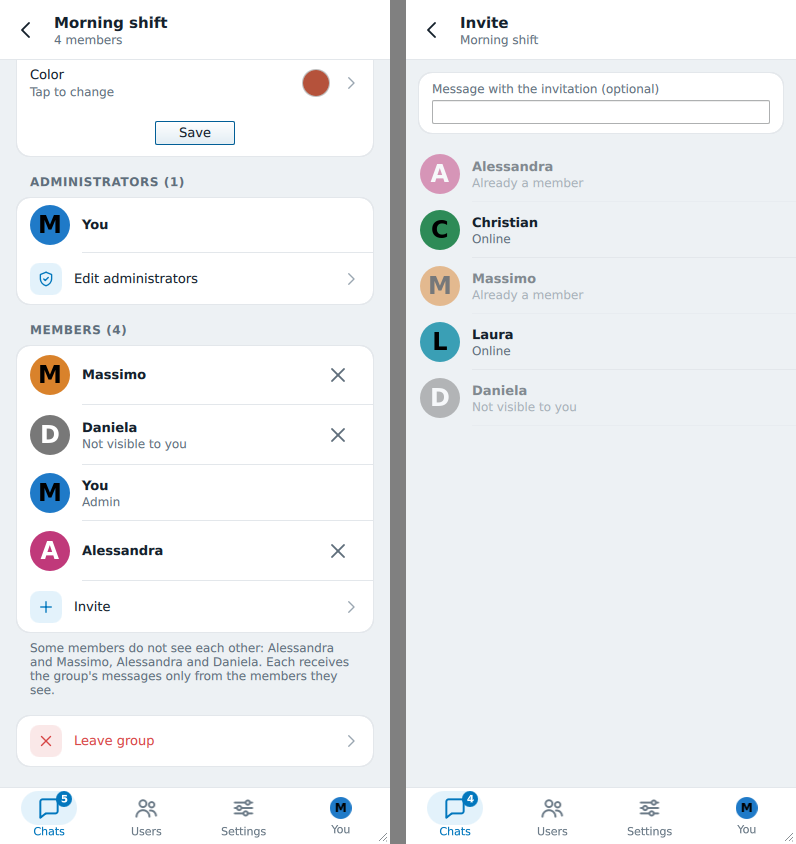
So the practical rule: before creating a group, make sure its members share a circle, or that this is exactly what you want. If a group looks inconsistent, with replies to messages nobody remembers, the first thing to check is not the network but the circles of its members.
If you come from BeeBEEP 5
Circles are the Workgroups under a new name, and the two understand each other. The new BeeBEEP sends its circles as its workgroups, so a BeeBEEP 5 user who accepts connections only from its workgroups accepts you when a name matches, and a workgroup of a BeeBEEP 5 user is a circle for you. What BeeBEEP cannot know is whether that person filters by them, so it applies only its own half of the rule: whether you accept them.
The one thing we removed is the option that made workgroups a mere label. In BeeBEEP 5 you could have workgroups and still see everybody; in the new version that option no longer made sense, and circles always filter. If you want to be in a circle and still see everyone, you join every circle. When you import a BeeBEEP 5 installation, its workgroups become your circles only if its option to accept connections only from them was on: otherwise they were labels, and turning them into circles would hide people you could see before.
A circle is a name, and whoever shares it sees you. It is a small idea, and it works as long as everybody knows what it hides.